Examiner AI and Mark for Me: How AI Marking Helps You Revise Smarter for GCSE and A-Level
Every student has been there. You finish a past paper, check the mark scheme, and still can’t tell whether your answer would earn two marks or four. Marking your own work is unreliable, and waiting for a teacher takes time. That is the gap that examiner AI tools are built to fill, and it is the idea behind Mark for Me on TopGrades, an AI-powered GCSE and A-Level revision platform. This post explains how AI marking works, how to use it well,
and what to keep in mind.
What Examiner AI Means
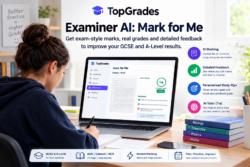
Examiner AI is the use of artificial intelligence to mark exam answers the way an examiner would: against the mark scheme and with reference to grade boundaries. Instead of a vague “looks good”, you get a mark, an estimated grade, and feedback on where each mark was won or lost.
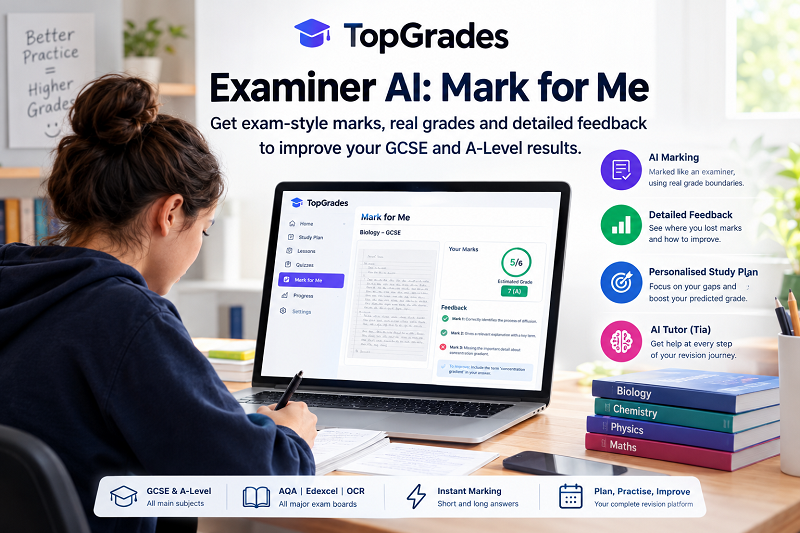
TopGrades describes its approach as “mark like an examiner”. You submit your answers, the AI marks them against the mark scheme and real grade boundaries, and you receive an estimated grade plus feedback on each mark point and what to do to move up a grade.
How Mark for Me Works
According to TopGrades, marking takes three steps:
- Upload your answers. Type them in, or upload a photo or scan of a full past-paper answer, in any subject and for any supported exam board.
- The AI marks like an examiner. Each answer is marked against the mark scheme and real grade boundaries.
- Get a grade and feedback. You see an estimated grade, where each mark was won or lost, and what to do next.
The platform says it supports GCSE and A-Level across the main subjects and the AQA, Edexcel, and OCR exam boards, including essay subjects and calculation-heavy ones such as Maths and the sciences. It also marks shorter exam-style questions instantly, so you can drill a topic quickly.
Why Mark-by-Mark Feedback Matters
A total score tells you little. What helps is knowing exactly where the marks went. If you lost two marks on a six-mark question, was it a missing keyword, an incomplete explanation, or a calculation slip? TopGrades says its feedback covers each mark point and includes model phrasing you missed.
This matters because exam marking is built around specific points. Students often know the content but miss the wording, structure, or reasoning that the mark scheme rewards. Seeing those gaps in your own answers is one of the fastest ways to improve.
Grades Based on Real Boundaries
TopGrades says marks map to official past-paper grade boundaries, so your estimated grade reflects how the answer would fare in the real exam. That is more useful than a raw percentage. A score that looks mediocre may be a solid grade on a hard paper, and boundaries vary between papers and boards.
More Than Marking: The Whole Revision Loop
Marking is most useful when it feeds into what you do next. TopGrades positions itself as an all-in-one revision platform:
- Plan and organise: a study plan built around your exam dates, with spaced-repetition reminders and a place for notes and resources
- Learn and practise: board-specific lessons and adaptive quizzes for every spec point, in plain English
- Mark like an examiner: upload a paper for examiner-style marks, a grade, and feedback in minutes
- Target and track: every lost mark becomes a focused lesson and quiz, so you can close gaps and watch your predicted grade rise
There is also Tia, an AI tutor that helps at each step. The platform currently lists lessons for GCSE Biology, Chemistry, Physics, and Maths, with more subjects available.
How to Get the Most From AI Marking
Here are practical ways to use a tool like this well. This is general study advice, not specific TopGrades guidance.
Do real past papers under timed conditions. The feedback is more valuable when your answers reflect true exam performance.
Write full answers. Don’t skip questions you find hard. A blank answer gives the AI nothing to mark, and nothing to learn from.
Read the feedback properly. The gain comes from the mark-by-mark comments, not the headline grade. Rewrite weak answers using the model phrasing.
Re-test weak topics. After fixing a gap, try a similar question a few days later to check that it stuck.
Track trends, not single scores. One paper can be a good or bad day. Look at patterns across several attempts.
What to Keep in Mind
AI marking is a revision aid, not an official result. An estimated grade is a guide, and a human examiner may mark some answers differently, particularly for open-ended or essay responses. Use the tool to find gaps and practise, and keep using your teacher’s feedback too, especially on extended writing and coursework-style tasks. If you are unsure how reliable the marking is for a particular subject, test it on an answer you already have a teacher’s mark for and compare.
Who It Is For
TopGrades says it is for students, tutors, and schools. Students get planning, lessons, practice, and marking. Tutors and schools can use it to support their learners, and the site has separate sections for each audience. Check the website for the features available in each case.
Getting Started
TopGrades offers a free tier with no card needed. You can create an account, add your subjects and exam dates, and get a first study plan. The pricing page explains how much marking each plan includes, so check it before you rely on it for a full revision season.
Frequently Asked Questions
1. What is examiner AI? AI that marks exam answers the way an examiner would, using the mark scheme and grade boundaries, then gives a grade estimate and feedback.
2. What is Mark for Me? TopGrades’ marking feature, where you upload your answers and get examiner-style marks, an estimated grade, and mark-by-mark feedback.
3. Which exam boards and levels does it cover? GCSE and A-Level across the main subjects, with AQA, Edexcel, and OCR supported.
4. Can I upload handwritten answers? TopGrades says you can type answers or upload a photo or scan of a past-paper answer.
5. Is the estimated grade official? No. It is a revision guide based on mark schemes and grade boundaries, and a real examiner may mark some answers differently.
6. Is it free? There is a free tier with no card needed. Check the pricing page for what each plan includes.
7. Does it offer anything besides marking? Yes, including study plans with spaced-repetition reminders, board-specific lessons, adaptive quizzes, and an AI tutor called Tia.
8. Who can use TopGrades? Students, tutors, and schools.